
Do You Need Wifi for Ring Doorbell? Network Requirements for 2026
Explore whether do you need wifi for ring doorbell setups require internet access, how offline chimes behave, and alternative connectivity options for November 2026.
 By John Carlsen
Updated October 3, 2026


Homeowners setting up smart entry hardware often wonder how these connected devices function when internet access is limited or completely unavailable. A common dilemma arises when asking: do you need wifi for ring doorbell setups at a vacation home, detached garage, or apartment where broadband service has not yet been established. While these cameras are engineered from the ground up as cloud-first security devices, understanding what features require active network access can prevent frustrating surprises during installation. If you are comparing different Ring video doorbell models, knowing the baseline networking requirements helps clarify what the hardware can accomplish right out of the box.
The short answer is that internet connectivity is fundamentally required to access core smart features such as push notifications, remote live viewing, and cloud-stored video recordings. Without an active local network, the camera sensor and cloud backend cannot communicate with your smartphone or digital assistant devices. However, depending on whether you evaluate wired versus wireless doorbells, certain physical behaviors like pressing the button can still trigger an existing mechanical chime inside your hallway. Exploring how local wireless communication interacts with these devices will help you decide if a smart doorbell fits your property.
| Award | Product | SSG Score About SSG ScoreThe SSG Score is our own rating from 0 to 10, based on performance, design and build, ease of use, and value. It reflects independent research and is never influenced by manufacturers, retailers, or affiliate commissions. Learn more › | |
|---|---|---|---|
| Best Overall |
Ring Battery Doorbell 2K Wireless Smart Video
|
9.2/10 | Buy |
| Best Budget |
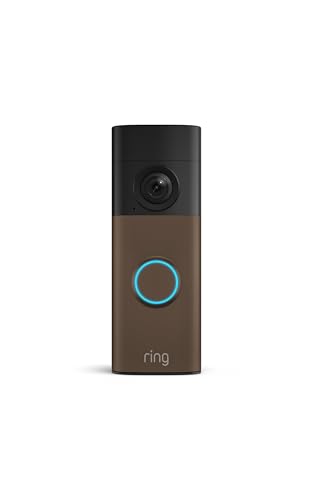 Ring Battery Doorbell 2K Wire-Free Video Security |
8.9/10 | Buy |
| Best Value |
 Ring Battery Doorbell (Newest Model) |
8.9/10 | Buy |
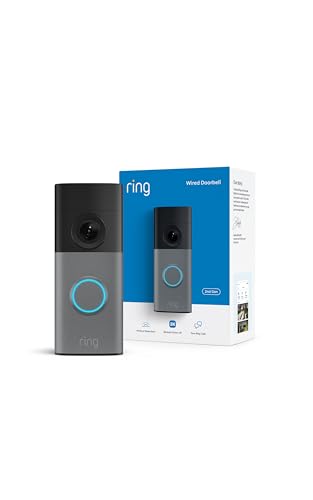 Ring Wired Doorbell 2K Smart Video Camera |
8.8/10 | Buy | |
 Ring Chime Plus Plug-In Wireless Audio Chime |
8.8/10 | Buy | |
| Best Premium |
 Ring Wired Doorbell 2K |
8.8/10 | Buy |
 Ring Wired Doorbell 4K Pro |
8.8/10 | Buy | |
 Ring Chime (3rd Gen) Plug-In Wi-Fi Indoor Speaker |
8.6/10 | Buy | |
 Ring Battery Doorbell 4K Pro Smart Video Doorbell |
8.3/10 | Buy | |
 Ring Battery Doorbell 2K |
8.0/10 | Buy |
Ring Battery Doorbell 2K Wireless Smart Video
The Ring Battery Doorbell 2K provides crisp Retinal 2K resolution, wide-angle viewing, and up to 6x enhanced zoom in a wire-free design. It is an excellent choice for homeowners and renters seeking dependable entryway coverage with seamless Amazon Alexa integration.
Pros
- Retinal 2K resolution with 6x enhanced zoom delivers clear visual detail for porch and entryway monitoring
- Completely wire-free battery operation allows fast mounting without existing doorbell chime wiring
- Direct integration with Amazon Echo devices enables convenient voice announcements and smart display streaming
- Simple detachment mechanism with the included release tool facilitates straightforward USB-C recharging
Cons
- USB-C charging cable is not included in the package and must be supplied separately
- Video recording playback and AI-powered smart alerts require an optional Ring Protect subscription
- Built-in battery design requires removing the entire doorbell unit from the wall to recharge
Ring Battery Doorbell 2K Wire-Free Video Security
The Ring Battery Doorbell 2K provides clear Retinal 2K video, 6x enhanced zoom, and responsive motion alerts in a sleek wire-free form factor. It is an ideal entryway security choice for homeowners and renters who want reliable front-door surveillance without running electrical wiring.
Pros
- Crisp Retinal 2K video resolution combined with 6x enhanced digital zoom for clear entryway details
- Built-in rechargeable battery provides simple, wire-free mounting ideal for apartments and rentals
- Reliable real-time motion push notifications and clear two-way audio for remote visitor screening
- Convenient hands-free integration with Amazon Echo Dot and Echo Show smart home displays
Cons
- USB-C charging cable is not included in the package and must be supplied separately
- Video recording storage and AI-powered smart motion filtering require an optional Ring Protect subscription
- Recharging the integrated battery requires detaching the entire doorbell unit from the doorframe
Ring Battery Doorbell (Newest Model)
This Ring bundle pairs the wire-free Battery Doorbell (2nd Gen) with the plug-in Indoor Cam Plus, delivering crisp 2K video clarity and two-way audio inside and out. It is an ideal home security starter package for renters and homeowners seeking simple front-porch and interior coverage without complex wiring.
Pros
- Wire-free battery installation on the doorbell makes it suitable for both renters and homeowners without existing doorbell wiring
- Crisp 2K retinal resolution with 6x digital zoom delivers sharp visual details across both indoor and outdoor zones
- Indoor Cam Plus features a physical sliding privacy shutter for verified optical blocking when home
- Indoor camera retains color viewing longer in low light before switching to black-and-white night vision
- Two-way talk and real-time live view enable direct communication from the companion mobile app
Cons
- Battery doorbell will require routine dismounting or recharging intervals since it operates without continuous low-voltage hardwiring
- Video streaming quality and zoom clarity can vary based on household internet bandwidth and ambient hardware temperatures
- Sliding the indoor privacy shutter blocks the camera lens but leaves the microphone live until manually disabled in the app
Ring Wired Doorbell 2K Smart Video Camera
The Ring Wired Doorbell 2K provides crisp Retinal 2K video with up to 6x enhanced zoom and nonstop hardwired power for reliable front-door monitoring. It is a solid choice for homeowners with existing wiring who want seamless Alexa integration and real-time visitor alerts.
Pros
- Sharp Retinal 2K video resolution with digital zoom capability up to 6x
- Hardwired continuous power removes the hassle of seasonal battery charging
- Native Amazon Alexa integration for hands-free chime announcements and display streaming
- Compact, modern profile in an attractive Speckled Gray finish
Cons
- Requires existing home electrical wiring, making it unsuitable for wire-free rental setups
- Video recording history and intelligent AI alerts require an ongoing Ring Protect subscription
- Lacks local onboard microSD card storage
Ring Chime Plus Plug-In Wireless Audio Chime
The Ring Chime Plus is an indoor plug-in alert speaker featuring boosted audio clarity, custom per-device chimes, and an integrated night-light. It provides reliable whole-home audio notifications for Ring doorbell and camera users who do not want to rely solely on smartphone alerts.
Pros
- Frees you from relying exclusively on mobile phone push notifications to know someone is at the door
- Customizable tones make it simple to distinguish front-door chimes from backyard camera motion triggers
- Integrated scheduled night-light doubles as useful hallway or entryway accent lighting
- Fast plug-in deployment requires zero low-voltage wiring, screws, or mounting brackets
Cons
- Takes up a standard indoor electrical wall outlet receptacle
- Designed exclusively for the Ring smart ecosystem and select Amazon Sidewalk compatible sensors
- Audio alert range and Sidewalk features depend on placement and local network signal coverage
Ring Wired Doorbell 2K
The Ring Wired Doorbell 2K Plus provides continuous hardwired power and Retinal 2K clarity with Low-Light Sight color video. It is a solid choice for homeowners looking to upgrade existing doorbell wiring with detailed entryway monitoring and intelligent motion alerts.
Pros
- Continuous hardwired power connection removes the need for frequent battery recharging or battery maintenance.
- Retinal 2K resolution and wide-angle coverage deliver clear daytime clarity with enhanced digital zoom.
- Low-Light Sight preserves true color detail under low ambient light before switching to crisp black-and-white.
- Video Descriptions offer immediate contextual event summaries directly inside mobile notifications.
Cons
- Requires existing doorbell wiring for installation, making it unsuitable for renters without pre-wired setups.
- Video Descriptions and extended video history features require an ongoing compatible Ring subscription.
- Video Descriptions feature is currently unavailable for residents in Illinois due to state legislative restrictions.
Ring Wired Doorbell 4K Pro
The Ring Wired Doorbell 4K Pro delivers ultra-sharp Retinal 4K video, 10x enhanced zoom, and 3D motion tracking through a dependable hardwired connection. It is an excellent choice for homeowners looking to upgrade existing doorbell wiring for high-detail visitor verification and nonstop front-porch security.
Pros
- High-clarity Retinal 4K video with 10x digital zoom for inspecting distant porch and walkway details
- Nonstop hardwired power eliminates the hassle of battery removal and seasonal recharging
- Advanced 3D Motion Detection helps reduce false alerts from street and sidewalk traffic
- Low-Light Sight technology keeps video in full color using low ambient light before switching to black-and-white
- Two-Way Talk with Audio+ ensures clear two-way communication with visitors and delivery couriers
Cons
- Requires functional existing doorbell wiring, making it unsuitable for wire-free rental setups
- Video Descriptions and cloud video recording require an ongoing Ring subscription (Video Descriptions unavailable in Illinois)
- Lacks an onboard microSD slot or local storage option, requiring network cloud connectivity for saved clips
Ring Chime (3rd Gen) Plug-In Wi-Fi Indoor Speaker
The Ring Chime (3rd Gen) is an easy indoor plug-in accessory that provides audible chime tones and motion alerts throughout your home without relying solely on phone notifications. It is a practical addition for Ring doorbell and camera owners wanting clear, real-time audio alerts in upstairs rooms, home offices, or living areas.
Pros
- Plugs directly into standard interior outlets without running low-voltage wiring or replacing mechanical chime boxes
- Upgraded speaker output helps ensure visitor alerts and motion triggers are heard from separate floors or rooms
- Supports customizable chime tones, dedicated volume adjustments, and practical alert snoozing
- Simple setup using Bluetooth pairing and standard Wi-Fi connectivity via the companion app
Cons
- Works specifically within the Ring ecosystem and does not integrate natively with third-party camera systems
- Requires an open standard indoor electrical wall outlet, occupying socket space in your living area
- Does not function as a Wi-Fi range extender unlike step-up Chime Pro models
Ring Battery Doorbell 4K Pro Smart Video Doorbell
The Ring Battery Doorbell 4K Pro delivers high-clarity Retinal 4K video, radar-powered 3D Motion Detection, and a fast-charging removable battery pack. It is an ideal wire-free front-door security solution for homeowners and renters seeking top-tier visual clarity without dealing with complex hardwired installations.
Pros
- High-definition Retinal 4K video with 10x digital zoom for inspecting fine entryway and parcel details
- Wire-free battery setup provides versatile installation for both apartment renters and suburban homeowners
- Radar-powered 3D Motion Detection helps deliver precise alerts with fewer disruptions from passing traffic
- Quick Release Ultra Battery Pack enables fast recharging without removing the entire doorbell fixture
- Two-Way Talk with Audio+ ensures responsive voice communication with porch visitors
Cons
- Accessing saved video event history and AI-driven alerts requires a separate Ring Protect subscription
- No onboard microSD card slot or local hub storage option for offline, subscription-free video archiving
- Frequent live streaming and high-resolution 4K recording may require more frequent battery recharging in busy entryways
Ring Battery Doorbell 2K
The Ring Battery Doorbell 2K delivers crisp Retinal 2K resolution, 6x digital zoom, and real-time mobile alerts via a completely wire-free, battery-powered setup. It is a practical front-door security choice for renters and homeowners looking for sharp video clarity and simple Alexa integration without electrical wiring.
Pros
- Crisp Retinal 2K video clarity paired with 6x digital zoom for inspecting visitor details
- Completely wire-free battery design simplifies installation for apartment renters and homeowners alike
- Seamless smart home integration with Amazon Echo Show and Echo Dot devices
- Modern USB-C recharging interface with an included pin-release removal tool
Cons
- Video history playback and AI-powered smart alerts require a paid Ring Protect subscription
- Built-in battery requires taking down the entire unit to recharge, causing temporary front-door downtime
- USB-C charging cable is not included in the box and must be supplied separately
Understanding Connectivity Requirements for Ring Doorbells
Answering whether do you need wifi for ring doorbell hardware requires examining how smart security cameras process and transmit audio and visual data. Ring doorbells are fundamentally designed as network-connected communication nodes that bridge the physical entryway of your home with remote cloud servers. Without an active local wireless network, the unit cannot send outbound data to the companion application on your mobile device. Homeowners must understand how the device functions when severed from the web to determine if it meets their front-door security needs.
The Direct Answer: Why Ring Cameras Depend on Wi-Fi
A smart doorbell functions by capturing raw video frames, converting audio input, and passing motion alerts directly through an internet gateway. Because these devices lack integrated cellular radios or internal onboard hard drives, they depend on your home router as their sole bridge to external cloud infrastructure. When a visitor approaches or presses the doorbell button, the unit immediately attempts to establish an encrypted handshake with external servers. If no wireless signal is present, this handshake fails, leaving the device isolated from your personal devices.
Push notifications and live video feeds are entirely routed through cloud notification infrastructure. When your home network goes offline, the camera cannot transmit the trigger event to alert your smartphone or smart display. This limitation means you will not receive real-time motion alerts, delivery notices, or button-press pop-ups while away from home. The smart capabilities that define modern video monitoring effectively pause until an active internet connection is restored.
Offline Capabilities: What Still Works When the Internet Drops
Examining what happens when the internet drops reveals a clear distinction between digital smart features and physical functions. The video sensor, motion detection processing, and night vision infrared emitters may remain powered, but they cannot save or transmit their output. Ring devices do not contain internal microSD card slots or local flash storage to buffer footage recorded during a connection loss. Any motion event that takes place while the internet connection is severed is permanently lost rather than queued for later upload.
Battery-powered doorbells mounted without hardwired connections suffer the most significant functional loss during an outage. Without low-voltage wiring running to a mechanical chime box, these units rely exclusively on digital chimes or smartphone notifications to signal visitor arrival. When the local network disconnects, a visitor pressing the button will produce an exterior chime tone from the camera itself, but no sound will emit inside your home. In an unlinked state, a standalone battery doorbell functions merely as a decorative button that alerts only the person standing outside.
Physical Chime Behavior: Hardwired Loops vs. Wireless Chimes
Homeowners with existing low-voltage doorbell wiring often wonder if their physical hallway chime will continue to ring during an internet failure. The electrical loop powering an analog mechanical chime relies on an alternating current transformer, usually rated between 16 and 24 volts AC. When a hardwired Ring doorbell button is depressed, an internal switch closes the circuit loop regardless of the status of your router. As a result, the physical solenoid plunger strikes the chime tone bar just as an old-fashioned push button would.
Electronic digital chime boxes, which play pre-recorded melodies through an integrated speaker, require specialized diode or power module connections. These electronic units depend on steady voltage delivery and may exhibit unpredictable behavior if the doorbell resets during a network drop. In contrast, proprietary plug-in accessory chimes rely entirely on local wireless communication protocols to receive trigger events. If your router loses power or experiences a broadband disruption, wireless plug-in chimes cannot sound an alert within your living space.
Using Mobile Hotspots and Cellular Connections at Remote Sites
Setting up smart surveillance at remote locations, job sites, or seasonal cabins often forces users to look beyond fixed broadband lines. While the doorbell hardware cannot accept a direct cellular SIM card, it can connect to a dedicated mobile hotspot or cellular router. A mobile hotspot creates a standard local wireless broadcast that mimics a residential home network, allowing the doorbell to pair successfully. This workaround provides full cloud access, live streaming, and smartphone notifications as long as cellular reception remains strong.
Utilizing a mobile hotspot introduces practical constraints regarding continuous data consumption and thermal stability. Video doorbells transmit substantial amounts of data, especially when configured for high motion sensitivity or continuous live monitoring. Streaming high-definition or Retinal 2K video feeds over a metered cellular plan can rapidly exhaust monthly high-speed data allowances. Homeowners exploring standalone wireless smart doorbells for off-grid applications must monitor data usage carefully to avoid unexpected bandwidth throttling.
Frequency Bands: 2.4 GHz Range vs. 5 GHz Throughput
Wireless frequency selection plays a major role in the overall reliability and latency of your front-door camera. Most smart video doorbells rely primarily on the 2.4 GHz frequency band due to its superior propagation characteristics through physical barriers. Exterior building materials such as brick, stucco, stone veneer, and metallic storm doors attenuate high-frequency radio waves significantly. The longer wavelengths of 2.4 GHz signals penetrate dense exterior framing far more effectively than shorter, faster frequencies.
Dual-band models capable of connecting to 5 GHz networks offer higher data transmission rates but suffer from restricted effective range. While 5 GHz channels can alleviate network congestion in suburban neighborhoods crowded with competing wireless signals, the signal degrades rapidly through insulated exterior walls. Placing a dual-band doorbell on a 5 GHz band often results in weak signal reception unless the wireless router is positioned directly adjacent to the entryway. Evaluating your porch signal strength using in-app diagnostic metrics helps determine the most dependable frequency band.
Upstream Bandwidth Demands for High-Resolution Sensors
Video doorbells with upgraded optical sensors, such as Retinal 2K or 4K Pro models, demand greater network throughput to operate smoothly. Higher pixel counts produce larger data payloads that must be compressed and transmitted in real time across your local router to the cloud. When multiple connected devices share the same wireless network, upstream bandwidth bottlenecks can cause video stuttering or dropped frames. A home connection with limited upload capacity may struggle to sustain clear high-resolution feeds alongside regular household internet traffic.
Upstream speed is far more critical for video doorbell operation than downstream download speed. While streaming movies or browsing websites utilizes downstream bandwidth, your front-door camera continuously uploads rich video data to remote servers. A minimum dedicated upload speed of two to four megabits per second per active camera is generally recommended for consistent performance. If your household operates multiple smart cameras simultaneously, ensuring sufficient aggregate upload bandwidth prevents connection timeouts during live-view sessions.
Local Storage Differences and Subscription-Free Alternatives
Homeowners who prefer completely independent operation often look for smart entry devices that do not rely on external cloud connections. Ring devices are fundamentally built around a cloud ecosystem where recorded events are stored on remote servers through an optional subscription plan. Without an active network connection and cloud plan, historical video clips cannot be saved, searched, or reviewed at a later time. This cloud dependency makes the system vulnerable to outages caused by regional internet service disruptions.
If internet independence and recurring fee avoidance are your primary goals, researching subscription-free video doorbell options provides valuable insight into alternative hardware designs. Competing security brands frequently incorporate on-device microSD memory cards or dedicated local base stations with onboard solid-state storage. These alternative architectures record motion events locally, allowing the camera to preserve security footage even if the residential internet connection goes down. Choosing between cloud-tethered devices and local-storage systems involves balancing convenience against privacy and network autonomy.
Power Management: How Network Drops Impact Battery Life
The relationship between network stability and device battery consumption is frequently overlooked by new smart doorbell owners. When a battery-powered video doorbell experiences an internet outage, its internal Wi-Fi chip enters an aggressive scanning state to re-establish contact with the router. Continually broadcasting search probes consumes significantly more electrical current than maintaining a quiescent standby connection. A prolonged network interruption can drain a rechargeable battery pack in a matter of days rather than weeks.
Hardwired installations mitigate this excessive drain by supplying continuous low-voltage alternating current from a dedicated transformer. Even during an extended network blackout, the trickle-charge mechanism prevents the internal battery chemistry from discharging completely. However, homeowners must verify that their low-voltage transformer delivers adequate continuous power under full operational load. Cold ambient temperatures further compound battery drain, making a stable wireless signal essential for preserving battery longevity across seasonal changes.
Step-by-Step Diagnostic Routine for Offline Doorbells
When a smart doorbell unexpectedly falls offline, systematically diagnosing the connection path resolves the issue quickly. The first step involves checking the primary broadband gateway to verify that other wireless devices in your home maintain active internet access. If your smartphone can browse the web over your local Wi-Fi network, the issue is isolated to the exterior entryway device or its immediate signal path. If the router itself has lost connection, power cycling the networking equipment often restores functionality across all connected hardware.
Performing a controlled hardware restart or soft reset on the doorbell itself can clear temporary firmware cache errors. For battery-powered models, detaching the unit using the included security pin and reseating the battery pack forces the internal operating system to reboot. Hardwired models can be safely power-cycled by switching off the dedicated residential circuit breaker for thirty seconds before restoring power. Once the unit restarts, it will initiate a fresh handshake with your router, resolving minor software hangs without erasing your personalized device settings.
Front Porch Signal Optimization and Closing Takeaways
Achieving a resilient, low-latency connection requires intentional placement of your wireless networking hardware. Because the front porch is often located at the physical perimeter of a residence, it frequently resides in a wireless coverage fringe. Installing a dedicated mesh network node or wireless range extender within fifteen to twenty feet of the front entryway dramatically improves signal penetration. Positioning the router away from large appliances, microwave ovens, and dense masonry walls minimizes radio frequency reflection and path loss.
Setting up dedicated network channels can prevent the doorbell from competing with bandwidth-intensive household devices. Configuring a separate 2.4 GHz guest network or smart-home subnet allows you to reserve transmission capacity exclusively for entry security cameras. Routinely monitoring your device health dashboard in the companion application provides proactive insight into potential connectivity degradation before the unit drops offline completely. Resolving connection bottlenecks early guarantees that your front-door camera remains responsive, dependable, and fully capable of protecting your threshold.
About the author
John Carlsen is a home security and smart home specialist with more than a decade of experience researching and testing security technology. His expertise covers DIY security systems, security cameras, smart devices, pricing, contracts, and connected-home technology. He combines hands-on product testing with detailed research to explain strengths, limitations, ownership costs, and real-world value in straightforward terms for homeowners and renters.