
Where to Put a Security Camera: Practical Placement Guide for 2026
Find out where to put a security camera for optimal coverage, clear facial identification, and minimal false alerts across your property in November 2026.
 By Tyler Lacoma
Updated November 5, 2026


Positioning a surveillance device too high often captures only the tops of hats, while placing it too low invites vandalism or physical tampering. Determining exactly where to put a security camera requires balancing clear viewing angles with physical equipment safety, ensuring you capture identifiable facial features rather than meaningless shadows. Property owners must navigate tricky variables like morning sun glare, low-light infrared reflection off soffits, and wireless signal loss through thick exterior walls. Setting up versatile hardware such as wire-free battery cameras with local storage allows for flexible repositioning, but physical location remains the primary factor in whether recorded footage serves as actionable evidence.
Entry doors, ground-floor windows, and open driveways represent the most vulnerable security choke points across residential layouts. Carefully targeting these primary transit paths while maintaining an optimal mounting height between seven and nine feet maximizes the effective field of view and preserves edge-to-edge optical clarity. Careful positioning also helps you avoid chronic notification fatigue triggered by moving tree branches or busy street traffic. By matching your specific hardware capabilities to the physical demands of each monitoring zone, you can establish comprehensive perimeter protection that keeps your home secure around the clock.
| Award | Product | SSG Score About SSG ScoreThe SSG Score is our own rating from 0 to 10, based on performance, design and build, ease of use, and value. It reflects independent research and is never influenced by manufacturers, retailers, or affiliate commissions. Learn more › | |
|---|---|---|---|
| Best Overall |
IHOMWAY K09 2K Dual-Band Security Camera
|
9.1/10 | Buy |
| Best Budget |
 WALI TC-W2 Dummy Security Camera (2-Pack) |
9.1/10 | Buy |
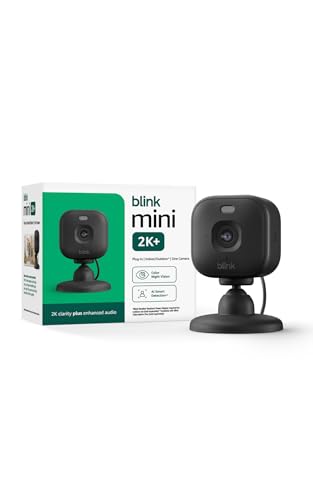 Blink Mini 2K+ Plug-In Indoor Smart Security |
9.1/10 | Buy | |
| Best Premium |
 HITELLARCAM 2K Wireless Outdoor Security Camera |
8.8/10 | Buy |
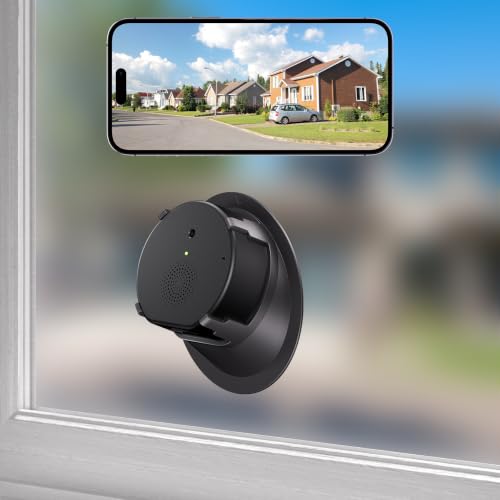 Fazoxo 2.5K Wireless Window Camera |
8.6/10 | Buy | |
| Best Value |
 Vimtag 2.5K Indoor Outdoor Security Camera 2-Pack |
8.4/10 | Buy |
 AOQEE G5 2K Indoor Security Camera (2-Pack) |
8.1/10 | Buy |
IHOMWAY K09 2K Dual-Band Security Camera
Built for indoor monitoring, the IHOMWAY K09 pairs crisp 2K video with dual-band Wi-Fi support for low-latency live streaming. Continuous local recording and free rolling cloud storage make it a practical choice for keeping tabs on pets or family without monthly subscription fees.
Pros
- Supports both 2.4GHz and 5GHz Wi-Fi networks
- Free rolling cloud storage with no subscription required
- Sharp 2K video with non-disturbing infrared night vision
- Continuous 24/7 recording onto high-capacity microSD cards
- Customizable AI motion detection reduces false alarms
Cons
- Fixed viewing angle with no pan or tilt capability
- MicroSD card is not included in the box
- Requires a nearby outlet for constant wired power
WALI TC-W2 Dummy Security Camera (2-Pack)
The WALI TC-W2 provides a low-maintenance visual theft deterrent for homes and storefronts without requiring complex wiring. Each compact bullet-style unit features an integrated flashing LED to convincingly mimic an active surveillance system.
Pros
- Realistic design effectively mimics authentic cameras
- Simple wire-free installation on walls or ceilings
- Flashing red light enhances visual deterrence
- Includes mounting hardware and security decals
Cons
- Lacks motorized pan movement
- Requires AA batteries that are not included
- Does not record actual video footage
Blink Mini 2K+ Plug-In Indoor Smart Security
The Blink Mini 2K+ is a compact plug-in indoor security camera that delivers crisp 2K video resolution, clear two-way audio with noise cancellation, and seamless Alexa compatibility. It is an ideal surveillance solution for apartment renters, pet owners, and homeowners seeking straightforward, dependable indoor monitoring.
Pros
- Sharp 2K video resolution with up to 4x zoom provides clear daytime and low-light indoor coverage.
- Upgraded two-way audio with noise cancellation makes communicating with pets or visitors clear and intelligible.
- Ultra-compact and lightweight design fits easily onto shelves or mounts to walls with the included hardware.
- Doubles as an indoor plug-in chime when paired with an optional Blink Video Doorbell.
- Plug-in AC operation ensures continuous surveillance without battery recharge cycles.
Cons
- Advanced person and vehicle AI detection features require an optional paid Blink Subscription Plan.
- Requires proximity to an electrical wall outlet, limiting placement options away from AC power.
- Exterior placement requires purchasing a separate weather-resistant power adapter.
HITELLARCAM 2K Wireless Outdoor Security Camera
The HITELLARCAM 2K wireless outdoor security camera provides wire-free surveillance featuring dual-band Wi-Fi, full-color night vision, and flexible storage via a microSD slot or free SD-quality cloud tier. It serves as an accessible option for suburban homeowners or renters seeking budget-friendly entryway and perimeter coverage without mandatory monthly fees.
Pros
- Dual-band 2.4GHz and 5GHz Wi-Fi support provides flexible home network integration
- Free SD-quality cloud storage option provides clip access without mandatory subscription fees
- Onboard microSD card slot supports up to 256GB for zero-monthly-cost local video storage
- IP66 weather-resistant construction withstands exposure to outdoor rain and dust
- Integrated LED spotlights enable full-color night recording and visual deterrence
Cons
- Free cloud storage tier is limited to standard-definition playback unless upgraded to a paid plan
- MicroSD card is not included with the camera and must be purchased separately
- Battery runtime varies significantly based on trigger frequency, live-view streaming, and cold temperatures
Fazoxo 2.5K Wireless Window Camera
Designed for glass-mounted home surveillance, this wire-free camera delivers 2.5K video with a helpful six-second pre-roll buffer before motion triggers. An adjustable bracket and rechargeable battery allow flexible placement on windows without running power cords.
Pros
- Sharp 2.5K resolution with wide F1.6 aperture
- Six-second pre-roll captures context before motion occurs
- Completely wire-free battery design for flexible placement
- Supports local microSD storage without mandatory monthly fees
Cons
- MicroSD card must be purchased separately
- Color night vision requires ambient light to function
- Cloud video storage requires an optional paid subscription
Vimtag 2.5K Indoor Outdoor Security Camera 2-Pack
The Vimtag 2.5K Indoor/Outdoor Security Camera 2-Pack offers 4MP video clarity, dual-band Wi-Fi flexibility, and color night vision backed by a built-in spotlight and siren. It provides a versatile, cost-effective monitoring solution for homeowners and renters seeking reliable indoor or perimeter coverage with local microSD storage support.
Pros
- Dual-band 2.4 GHz and 5 GHz Wi-Fi compatibility provides greater connection flexibility than standard 2.4 GHz-only cameras
- Solid 2.5K video resolution paired with spotlight illumination ensures clear daytime and nighttime video capture
- IP66-rated enclosure allows seamless transition between indoor nursery monitoring and exposed outdoor surveillance
- Local microSD slot enables subscription-free video storage without forcing an ongoing monthly cloud fee
- Convenient plug-and-play setup supports freestanding tabletop placement or permanent wall mounting with included screws
Cons
- MicroSD card is not included in the box and must be purchased separately for local recording
- Continuous AC power connection is required, limiting placement to areas near electrical outlets
- Advanced cloud video recording and extended alert history require an optional paid Vimtag Cloud subscription
AOQEE G5 2K Indoor Security Camera (2-Pack)
Designed for pet and home monitoring, this two-pack delivers 2K video resolution with 360-degree pan-and-tilt tracking. Dual-band Wi-Fi and local microSD storage make it a flexible indoor surveillance option without requiring mandatory monthly subscription fees.
Pros
- Dual-band Wi-Fi offers versatile wireless network compatibility
- Auto-tracking keeps moving pets and people in frame
- Operates normally with local storage without cloud fees
- Invisible infrared lights avoid sleep disturbances at night
Cons
- Requires continuous wired power connection to operate
- MicroSD card is not included in the package
- Alexa voice control is limited strictly to live viewing
Strategic Security Camera Placement: Height, Angles, and Critical Zones
Installing an effective surveillance system starts with identifying where an intruder must step to access your home. Placing hardware at the primary entry doors, ground-floor windows, driveways, and indoor transit corridors creates an overlapping safety net that leaves no vulnerable blind spots. Knowing where to put a security camera means placing equipment high enough to deter physical tampering while keeping the angle shallow enough to capture clear, actionable facial details. Balancing physical mounting heights, environmental lighting, network reception, and legal boundary compliance ensures every recorded clip serves a practical protective purpose.
Mounting Heights and the Downward Tilt Angle
Mounting an outdoor camera between eight and ten feet off the ground provides the most reliable balance between security coverage and physical protection. Placing equipment below seven feet leaves the housing vulnerable to intentional redirection, blunt impacts, or quick theft by someone standing on the ground. Conversely, mounting a camera above ten or twelve feet introduces a steep downward angle that severely degrades facial capture. High installations usually record only the crowns of heads or the brims of baseball caps, frustrating law enforcement and rendering high-resolution sensors far less effective.
Applying the international DORI standard (Detection, Observation, Recognition, and Identification) illustrates why camera pitch matters just as much as optical resolution. Forensic identification requires roughly seventy-six pixels per foot across the target subject, which is easily lost when a steep downward tilt compresses facial features against torso clothing. Angling your camera roughly fifteen to thirty degrees downward keeps the horizon in view while capturing a person from the waist up as they approach. This geometry maximizes optical clarity, preserves depth perception, and ensures on-device AI algorithms can distinguish human shapes from ambient neighborhood activity.
Front Porches, Main Entryways, and Package Drop Zones
Front doors represent the single most common point of access for both welcome visitors and opportunistic parcel thieves. Positioning a camera adjacent to the door frame or beneath an overhang protects the lens from direct rainfall while framing anyone who approaches the welcome mat. A dedicated entryway camera should feature a wide vertical field of view to capture doorstep parcels as well as standing visitors. Compact indoor plug-in devices like the Blink Mini 2K+ (newest model) can even serve as an auxiliary indoor chime and monitor inside the foyer when linked to compatible front door hardware.
Doorway environments frequently suffer from severe backlighting when bright morning sunshine contrasts with deep porch shading. Lenses without sufficient dynamic range will silhouette visitors into unrecognizable dark outlines, destroying critical identification evidence. Positioning your camera so that ambient light falls across the subject face rather than shining directly into the lens glass preserves color and texture. Integrating responsive two-way audio at the front door also allows property owners to acknowledge delivery drivers or warn away trespassers before they reach the threshold.
Driveways, Garages, and Perimeter Approach Corridors
Driveways and exterior garage aprons represent expansive zones where vehicles park and unauthorized visitors frequently enter residential curtilage. Broad driveways require wide horizontal coverage to track movements from the public street all the way to interior access gates. Setting up weather-resistant units like the 2026 Upgraded 2K Security Cameras provides rechargeable wire-free mobility along exterior garage fascia without demanding complex wall penetrations. Combining battery power with an IP66 rated waterproof housing ensures that long approach corridors remain constantly monitored through shifting seasonal weather.
When monitoring wide properties, positioning cameras to cross paths with approaching traffic delivers far superior motion detection compared to aiming straight down the pavement. If you need dynamic coverage across expansive vehicle parking spaces, exploring driveway pan-tilt-zoom camera configurations helps track subjects across broad property lines without creating persistent blind zones. Adding spotlight illumination along driveway perimeters also forces low-light cameras to switch from monochrome infrared into vivid full-color recording. Capturing true vehicle colors and clothing patterns provides essential details that standard black-and-white night vision simply cannot deliver.
Back Doors, Basements, and Vulnerable Ground-Floor Windows
Rear patios, sliding glass doors, and basement egress windows are frequently targeted by intruders seeking concealment away from street visibility. Because these secluded access points often lack ambient streetlighting, positioning cameras near secondary doors requires reliable onboard night vision and loud siren deterrents. Dual-purpose hardware like the VIMTAG 2.5K Cameras for Home Security handles both indoor and outdoor placements, offering built-in white spotlights and sound alarms to startle trespassers who loiter near dark backyard entries. Securing these low-visibility areas stops perimeter breaches before an intruder gains leverage on residential locks.
Budget constraints sometimes prevent property owners from running expensive active cameras around every secondary ground-floor casement window. In these lower-priority perimeter zones, installing visible deterrence units like the WALI Fake Security Camera with Flashing Red Light can discourage casual trespassers at minimal cost. Mixing conspicuous dummy bullet cameras along exterior siding alongside genuine recording hardware creates the impression of complete surveillance coverage. Just make sure dummy hardware is placed at realistic heights and paired with authentic warning decals to maintain a convincing visual defense.
Indoor Common Areas, Hallways, and High-Traffic Living Spaces
Indoor camera placement requires balancing effective property surveillance with personal family privacy. Pointing cameras down central hallways, stairwell landings, and primary living room access paths ensures that any intruder who enters through a window must cross a monitored corridor. Placing indoor hardware on high corner shelving or wall brackets keeps power cables organized while providing an expansive view across the entire room. Pan-tilt models like the AOQEE 5G Cameras for Home Security Indoor eliminate stationary blind spots by utilizing 360-degree motor rotation to track moving pets, children, or unexpected interior motion.
Indoor living spaces also introduce heavy wireless congestion from smart televisions, mobile phones, and streaming boxes competing for local bandwidth. Deploying dual-band indoor devices like the 5G&2.4GHz Indoor Security Camera, 2K, Free Cloud allows homeowners to utilize faster 5GHz network bands to minimize live-stream latency. Placing stationary indoor cameras near high-traffic living spaces also allows caretakers to check on family members or pets using real-time two-way audio. Always keep private residential quarters like master bedrooms and bathrooms completely off-limits to indoor surveillance to preserve personal boundaries.
Window Placements and Eliminating Glass Glare
Placing a standard indoor camera on an interior windowsill to monitor the driveway or porch frequently results in severe image distortion. Double-pane modern glass reflects internal room lighting back into the lens, producing an impenetrable glare that obscures outdoor subjects. Even worse, traditional infrared LEDs illuminate the glass surface rather than the yard, blinding the optical sensor the moment darkness falls outside. Homeowners who must monitor exterior perimeters through glass need specialized hardware designed to eliminate window reflection.
Dedicated designs like the Fazoxo 2.5K/4MP FHD Indoor Wireless Window address this problem directly with wide F1.6 apertures that gather ambient outdoor street lighting without activating glaring infrared bulbs. This camera buffers six seconds of pre-roll footage before motion occurs, ensuring you see the exact beginning of an event rather than someone walking away. When installing any camera against a window pane, press the lens flush against the glass and turn off all interior room lights. Using blackout silicone brackets or non-reflective tape around the lens perimeter will prevent indoor reflections from corrupting your exterior surveillance view.
Motion Detection Physics: Passive Infrared vs. Optical Field of View
Understanding how camera sensors detect movement prevents frustrating missed recordings and constant false notification spam. Battery-powered security cameras rely on passive infrared (PIR) sensors that measure shifting thermal radiation across split optical zones. PIR sensors react fastest when warm bodies move across their field of view from left to right or right to left. When an intruder walks directly toward a camera lens along a straight path, the thermal shift across sensor zones is minimal, which can delay wake-up triggers until the subject is already standing beneath the mount.
Angling outdoor cameras so that walkways cut diagonally across the frame yields prompt wake-up times and complete video clip recordings. Avoid aiming PIR sensors directly at reflective metal roofs, swaying branches, or asphalt driveways that radiate heat under midday sunshine. Modern cameras pairing optical computer vision with onboard AI chips allow homeowners to establish custom detection zones that ignore passing street traffic. Filtering detection down to human shapes and vehicles dramatically curtails nuisance alerts while preserving critical battery reserve across wire-free installations.
Network Range, Power Access, and Outage Continuity
A perfectly aimed security camera becomes useless if it cannot maintain a stable data connection back to your home router. Thick exterior building materials like brick, stucco, stone, and insulated metal siding severely attenuate wireless signals. Before drilling mounting holes into siding, perform an on-site Wi-Fi survey using your smartphone to confirm an RSSI signal strength of -65 dBm or better at the exact mounting location. While 5GHz Wi-Fi delivers rapid live-view streaming, 2.4GHz signals travel significantly further through heavy exterior framing and should be prioritized for distant perimeter corners.
Power accessibility represents the other half of reliable placement planning. While battery-powered units offer unmatched positioning freedom, properties requiring non-stop 24/7 video capture benefit from wired infrastructure. Reviewing continuous recording Power over Ethernet systems highlights how running a single network cable provides both constant electrical current and high-speed data transmission immune to wireless jamming. Ensuring your cameras support onboard microSD or TF card storage also guarantees that motion events continue recording safely even if your broadband internet connection drops unexpectedly.
Privacy Boundaries, Property Lines, and US Surveillance Compliance
Mounting cameras along exterior fences and property borders requires careful attention to community privacy expectations and legal standards. Under established United States legal doctrine, individuals enjoy a reasonable expectation of privacy inside their homes, fenced backyards, and personal living quarters. While pointing a lens toward a public street or front driveway is generally lawful, angling cameras directly into neighboring bedroom windows or private patio spaces can trigger contentious civil disputes or nuisance claims. Utilizing software privacy masking tools inside your camera app allows you to black out neighboring property lines while maintaining full coverage of your own yard.
Audio recording introduces even stricter legal hurdles that property owners must carefully navigate before enabling external microphones. Federal wiretap law under 18 U.S.C. § 2511 and varying state-level eavesdropping statutes govern the interception of spoken communication. Certain jurisdictions operate under one-party consent rules, while others strictly enforce all-party consent before audio can be legally captured in spaces where private conversations occur. When monitoring areas where guests or neighbors congregate, disabling microphone recording or posting visible surveillance notices helps maintain compliance with regional wiretap regulations. Note that operational security practices do not substitute for formal legal counsel, so consulting local municipal ordinances remains prudent.
Finalizing your camera placement requires conducting a thorough real-world walk-through during both bright daylight and nighttime darkness. Stand at your driveway edge, property gates, and entry thresholds to confirm that your field of view captures sharp facial details without blinding lens flare or infrared reflection. Check that motion alerts trigger promptly on your mobile device as you walk across primary detection paths, and adjust activity zone masks to filter out passing roadway vehicles. Taking the time to properly position, angle, and verify each camera ensures that your security setup provides dependable property protection without irritating false alarms.
About the author
Tyler Lacoma is a smart home and home security technology expert with more than a decade of hands-on experience testing connected devices. His expertise includes security cameras, smart locks, home security systems, privacy features, smart-home compatibility, and emerging AI technology. He focuses on translating technical features into practical guidance that helps homeowners understand which security solutions truly fit their homes and everyday needs.