
How to Setup a Wired Security Camera System: Step-by-Step Guide for 2026
Master how to setup a wired security camera system with clean cable runs, DVR storage setup, and clear video settings in this November 2026 installation guide.
 By Alina Bradford
Updated November 18, 2026


Frustrations with dropped wireless signals, latency, and persistent cloud subscription fees lead many property owners to choose physical wiring over wireless alternatives. Learning how to setup a wired security camera system guarantees dependable 24/7 continuous video recording without saturating household Wi-Fi bandwidth or missing critical seconds due to battery sleep-mode wake delays. Physical copper lines deliver uninterrupted video streams directly to a local recorder, ensuring complete operational autonomy during broadband internet outages. For extensive residential layouts, exploring hardwired multi-camera installations provides substantial perimeter coverage without the maintenance burden of climbing ladders to recharge batteries in freezing weather.
Deploying a wired surveillance network requires methodical planning around cable routing, drill paths, camera mounting angles, and digital recorder configuration. Bundled equipment kits from manufacturers like ANNKE and VORGUT package optical sensors with pre-installed local storage drives and weather-resistant housings that streamline on-site assembly. Properly terminating connections, forming drip loops, and establishing fine-tuned motion detection parameters transforms bare hardware into an airtight surveillance grid. Taking the time to execute a clean physical installation yields an uncompromised security perimeter that delivers sharp forensic evidence for years to come.
| Award | Product | SSG Score About SSG ScoreThe SSG Score is our own rating from 0 to 10, based on performance, design and build, ease of use, and value. It reflects independent research and is never influenced by manufacturers, retailers, or affiliate commissions. Learn more › | |
|---|---|---|---|
| Best Overall |
Blink Outdoor 4 User Guide Paperback
|
9.2/10 | Buy |
| Best Value |
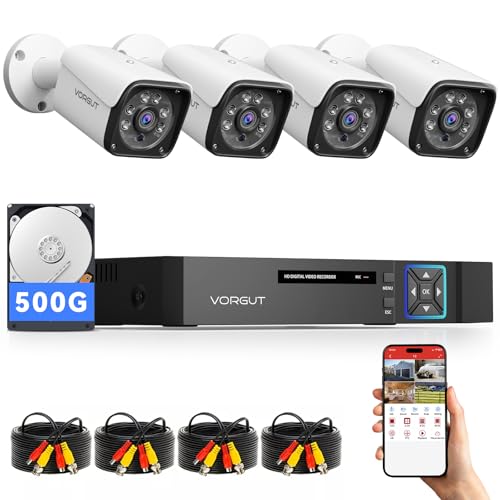 VORGUT 3MP 4-Camera Wired Security System |
9.2/10 | Buy |
| Best Budget |
 Samsung Galaxy A17 5G User Guide (Large Print) |
8.9/10 | Buy |
 Aiwixen 4-Channel Wired Security Camera System |
8.6/10 | Buy | |
 How to Set Up Home Security DIY Guide |
8.3/10 | Buy | |
| Best Premium |
 Aiwixen 4-Camera Wired Security System (512GB) |
8.0/10 | Buy |
 ANNKE 8-Channel 3K Lite Wired Outdoor Security |
7.8/10 | Buy |
Blink Outdoor 4 User Guide Paperback
This practical guide provides an offline reference to help owners install, monitor, and troubleshoot the Blink Outdoor 4 camera. Measuring 6 by 9 inches, the lightweight paperback format is easy to keep on hand during system setup.
Pros
- Covers setup through troubleshooting
- Beginner-friendly structure
- Compact 6 by 9 inch size
- Lightweight and portable format
Cons
- Paperback cover is prone to wear
- Static print cannot reflect software updates
VORGUT 3MP 4-Camera Wired Security System
Combining four weatherproof 3MP cameras with a pre-installed 500GB hard drive, this wired CCTV package provides dependable local recording without recurring subscription fees. It suits property owners seeking continuous, interference-free surveillance that does not tax home Wi-Fi bandwidth.
Pros
- No monthly cloud subscription fees required
- Durable IP66 metal weather-resistant camera housings
- Reliable wired connection avoids Wi-Fi dropouts
- Infrared night vision reaches up to 80 feet
Cons
- Running BNC cables requires more complex physical installation
- Requires wired Ethernet router connection for remote access
- 500GB capacity is modest for multi-camera continuous recording
Samsung Galaxy A17 5G User Guide (Large Print)
Tailored for beginners and seniors, this large print paperback provides illustrated instructions for navigating the Samsung Galaxy A17 5G on One UI 8. It covers core phone tasks, ranging from initial device setup to messaging, camera operations, and security settings.
Pros
- Large print layout enhances reading comfort
- Visual screenshots assist step-by-step navigation
- Clear focus on core daily phone operations
- Dedicated walkthroughs for beginner and senior needs
Cons
- Large 8.5 by 11 inch dimensions reduce portability
- Standard paperback cover provides minimal physical protection
- Instructions apply strictly to Galaxy A17 5G systems
Aiwixen 4-Channel Wired Security Camera System
The Aiwixen 4-Channel Wired Security Camera System delivers dependable perimeter intrusion surveillance with four weather-resistant cameras and a pre-installed 512GB hard drive for continuous recording. It is an ideal, zero-monthly-fee security choice for homeowners and property managers seeking reliable wired video coverage without recurring cloud costs.
Pros
- Pre-installed 512GB hard drive enables immediate continuous recording right out of the box with zero subscription fees
- Hardwired BNC connections provide stable video feeds immune to Wi-Fi congestion and wireless dropouts
- IP68-rated weatherproof camera housings and 100-foot infrared night vision withstand demanding outdoor conditions
- Standalone operation allows full local video monitoring without an active internet connection
- Customizable motion zones and sensitivity settings help reduce nuisance smartphone and email notifications
Cons
- Routing physical 60-foot BNC cables through walls, attics, or crawlspaces requires more installation effort than wire-free systems
- Remote mobile viewing and push alerts require a wired Ethernet connection from the DVR directly to your home router
- Four-channel DVR architecture limits the system to four cameras without room for future expansion on the base unit
How to Set Up Home Security DIY Guide
The Fixers Handbook by Majosta is a practical paperback guide that explains how to plan, position, and install DIY security cameras and burglar alarms without recurring contractor fees. It serves as an informative roadmap for homeowners and renters seeking to build an effective, subscription-free home surveillance system.
Pros
- Clear, structured instructions tailored for homeowners and apartment renters tackling DIY home security for the first time
- Helps buyers avoid costly professional installation fees and recurring monthly alarm monitoring subscriptions
- Covers complete property defense, bridging digital camera surveillance with physical door and window alarm sensors
- Compact 5.5 x 8.5-inch paperback format is lightweight and easy to reference while working on installation projects
Cons
- Instructional guide only; does not include physical surveillance hardware, cameras, or mounting tools
- Printed format cannot provide live software walkthroughs for rapidly changing camera apps and firmware menus
- Requires readers to cross-reference their specific camera manufacturer manuals for proprietary software settings
Aiwixen 4-Camera Wired Security System (512GB)
Equipped with four weatherproof cameras and a dedicated 512GB DVR, this wired security kit offers 24/7 continuous local recording with zero subscription fees. It delivers up to 100 feet of night vision and works as a standalone monitor setup or an app-connected remote system via router.
Pros
- Pre-installed 512GB hard drive with no monthly fees
- Rugged IP68 waterproof and weather-resistant camera housing
- Infrared night vision reaches up to 100 feet
- Customizable motion detection zones reduce false alerts
- Operates for local monitoring without an internet connection
Cons
- Requires running physical BNC cables to each camera
- Remote mobile access requires a wired router connection
- Modest 512GB drive capacity for four continuous video streams
ANNKE 8-Channel 3K Lite Wired Outdoor Security
The ANNKE 8-channel wired surveillance kit provides continuous 24/7 recording with a pre-installed 1TB hard drive, intelligent human and vehicle filtering, and smart dual-light night vision. It is an ideal, zero-monthly-fee security solution for homeowners seeking multi-camera perimeter coverage.
Pros
- Pre-installed 1TB hard drive delivers continuous 24/7 local recording without any mandatory cloud subscription fees.
- Smart Dual-Light design flexibly switches from 100-foot IR night vision to 66-foot full-color illumination when motion occurs.
- AI Motion Detection 2.0 filters for people and vehicles, allowing quick event searching during playback.
- Heavy-duty IP67 weather-resistance rating ensures dependable outdoor durability through harsh seasonal weather.
- Hybrid DVR architecture supports TVI, AHD, CVI, CVBS, and IP formats, facilitating future camera upgrades up to 3K or 5MP.
Cons
- Requires physical cable routing for all eight cameras back to the central DVR location.
- Included cameras capture in 1080p (2MP), which offers less digital zoom clarity than premium 4K systems.
- Permanent wired setup is generally unsuitable for apartment renters needing non-destructive installation.
Engineering a Dependable Wired Surveillance Infrastructure
Executing a reliable wired surveillance deployment requires balancing physical hardware placement, clean wiring, and logical recorder management. Unlike wireless setups that depend on radio frequency handshakes, physical cabling eliminates signal dropouts caused by brick, concrete, or foil insulation. A complete installation moves from pathway mapping and bench testing to cable pulling, exterior mounting, and recorder calibration. Following a structured installation sequence prevents mistakes such as pulling damaged cables through finished drywall or discovering power drop-offs after cameras are secured.
System Architecture: Coaxial DVR vs. Power over Ethernet NVR
Wired surveillance systems split into two distinct electrical topologies: analog systems driven by a Digital Video Recorder (DVR) or IP networks powered by a Network Video Recorder (NVR). Analog setups, such as packages from VORGUT and Aiwixen, rely on siamese coaxial cables terminating in BNC connectors. These dual-line cables split at each camera endpoint into a video lead and a 12V DC power plug. Analog HD systems transmit raw video signals directly across copper lines without packet conversion delays, providing budget-conscious properties with dependable point-to-point feeds.
Network Video Recorder systems operate across standard twisted-pair Ethernet cabling, typically Cat5e or Cat6, utilizing Power over Ethernet standards such as IEEE 802.3af. Ethernet architecture transmits digital data packets and low-voltage electrical power through a single eight-conductor cable, eliminating separate camera power splitters. While analog BNC systems provide exceptional value and straightforward local connectivity, IP-based PoE configurations deliver higher bandwidth capacity and flexible network integration. Selecting between coaxial DVR and PoE NVR platforms dictates the required cable spools, wall entry holes, and termination tools.
Pre-Installation Bench Testing and Component Verification
Staging surveillance hardware in a controlled workspace before climbing ladders or drilling exterior walls prevents frustrating troubleshooting later. Unpack the central recorder, optical units, power adapters, and factory-supplied BNC or Ethernet cables on a sturdy table near an electrical outlet. Connect each camera to its channel port on the recording hub using the exact cables intended for the permanent run. Power the entire assembly, connect the DVR or NVR to a monitor via HDMI or VGA, and verify that every video channel produces a live picture.
This preliminary testing phase provides the ideal opportunity to initialize the internal hard disk drive and upgrade system firmware. Kits featuring pre-installed storage, such as 512GB drives in Aiwixen units or 1TB drives in ANNKE systems, typically prompt administrators to format the partition upon initial startup. Navigating system settings while the recorder sits comfortably on a desk simplifies password creation, clock synchronization, and display configuration. Discovering a defective cable or an unresponsive image sensor during a bench test saves hours of physical troubleshooting on a ladder.
Strategic Camera Positioning and DORI Standard Optimization
Mounting cameras at the correct height and angle directly determines the evidentiary value of captured footage. Installing cameras between eight and ten feet above ground level balances an expansive field of view with an optimal downward angle for facial identification. Securing hardware too high creates steep downward viewing angles that capture only the tops of hats and vehicle hoods rather than identifiable facial traits. Positioning cameras within this height window also keeps the physical housings out of reach while preserving accessibility for routine lens cleaning.
Professional optical planning relies on the IEC EN 62676-4 DORI standard, which quantifies image sensor performance across four functional zones: Detection, Observation, Recognition, and Identification. Detection requires at least 25 pixels per meter to confirm the presence of a person, while forensic Identification requires 250 pixels per meter to establish indisputable facial features. Higher-resolution sensors, such as 3MP or 5MP hardware, allow homeowners to satisfy identification criteria at greater distances. Placing high-resolution fixed cameras along tight entry corridors, doorways, and gates ensures visitors move directly toward the lens.
Harsh ambient backlighting can severely compromise optical performance if cameras point directly toward the rising or setting sun. Position optical sensors with the primary sun path behind the housing whenever possible, utilizing integrated Wide Dynamic Range (WDR) to balance dark shadows and bright backgrounds. For wide perimeters such as vehicle turnarounds or long fences, blending fixed bullet cameras with motorized pan-tilt-zoom units for driveway coverage ensures expansive spatial observation without leaving critical entry choke points unmonitored. Proper angle planning prevents blind spots where intruders could exploit perimeter gaps.
Cable Routing Techniques and Weatherproof Wall Penetrations
Planning physical cable routes through interior voids protects surveillance wiring from severe weather exposure and intentional tampering. Running lines through ventilated attics, drop ceilings, or basement joists shields the outer PVC insulation from solar ultraviolet degradation. Use plastic J-hooks or insulated cable staples to suspend wiring along structural framing, preventing cables from resting on ceiling drywall or hot ductwork. Always maintain a minimum separation of six inches between surveillance wiring and high-voltage household electrical lines to prevent electromagnetic induction from introducing video static.
Exterior wall penetrations require deliberate mechanical techniques to prevent moisture from entering building envelopes. Drill all exterior holes with a spade or masonry bit tilted at a slight upward angle from the outside to the inside. This upward pitch ensures that ambient moisture clinging to the outer jacket cannot flow downward along the cable into interior wall cavities. Form a distinct U-shaped drip loop in the exposed cable directly beneath the wall entry point, forcing rainwater to gather at the curve and drop to the ground.
Sealing external holes with premium polyurethane or silicone sealant prevents water intrusion, insect entry, and seasonal draft leakage. For brick, stone, or stucco exteriors, mount cameras onto rated weatherproof junction boxes rather than screwing brackets directly into porous masonry. Junction boxes provide a secure, watertight enclosure for bulky BNC connectors and 12V DC power pigtails, protecting sensitive metal terminals from moisture corrosion. Enclosing these connections inside an IP66 or IP67 rated junction box dramatically reduces future system failures caused by corroded pin contacts.
Hard Drive Storage Allocation and Continuous Recording Modes
Configuring local video storage parameters balances historical retention spans against optical image quality and frame rates. Surveillance-grade hard disk drives are engineered specifically to endure continuous, non-stop write operations under high thermal conditions. Advanced video compression standards like H.265+ substantially compress raw video data rates without stripping away critical pixel sharpness, saving significant storage overhead compared to legacy codecs. Systems supporting H.265+ compression, such as ANNKE recording hubs, enable multi-camera setups to store weeks of continuous video footage on a modest 1TB hard drive.
Central recording hubs support versatile operational profiles, allowing administrators to assign continuous 24/7 capture, scheduled windows, or event-driven recording to individual channels. Continuous 24/7 video recording provides uninterrupted evidence, ensuring that subtle events occurring outside primary detection zones are never missed. When hard disk space approaches capacity, the operating system automatically overwrites the oldest unlocked video files in a continuous storage loop. Homeowners can tag critical evidentiary clips to prevent automatic deletion, preserving vital records for law enforcement or insurance investigations.
System expansion requires careful recalculation of hard drive endurance and overall retention timelines. As security needs evolve across a property, expanding network video recorders with add-on cameras divides available storage bandwidth across more channels, which accelerates the drive overwrite cycle. Upgrading to larger internal SATA hard drives, such as four-terabyte or ten-terabyte enterprise drives, restores extended recording archives for multi-camera deployments. Ensuring adequate storage overhead prevents the loss of older footage when resolving property disputes that emerge weeks after an occurrence.
Motion Detection Tuning and Environmental Alert Filtering
Uncalibrated motion detection creates severe notification fatigue, tempting property owners to silence mobile alerts and miss genuine security threats. Traditional pixel-based motion sensing flags activity whenever video pixels change luminance values, frequently triggering false alarms from shifting clouds, headlights, or insects. Modern wired systems incorporate smart AI algorithms, such as the human and vehicle detection protocols found on ANNKE hardware. These intelligent processing engines analyze moving objects based on physical contour metrics, filtering out benign background movements such as blowing leaves or falling rain.
Customizing detection zones within the recorder menu allows users to exclude persistent environmental triggers from alert schedules. Open the channel settings interface and paint custom motion detection grids across primary risk areas while excluding public sidewalks and busy roadways. Lowering sensitivity thresholds during windy seasons prevents swaying branches from saturating event logs with meaningless triggers. Configuring distinct schedules for daytime and nighttime monitoring ensures heightened alert posture during vulnerable overnight hours without unnecessary daytime disruption.
Infrared night vision performance requires careful attention to physical mounting clearance and reflective surfaces. Built-in infrared LEDs illuminate dark yards up to 80 or 100 feet, but near-field objects can cause severe optical flare. Mounting a camera too close to an overhanging soffit, gutter downspout, or white wall causes infrared light to bounce directly into the lens, blinding the sensor. Angling the camera slightly downward and away from adjacent wall surfaces preserves dynamic contrast, allowing night vision sensors to produce clean, usable monochromatic or full-color imagery.
Network Isolation, Remote Access, and Privacy Compliance
Wired surveillance systems deliver full local functionality, displaying live video and recording 24/7 footage directly to an attached monitor without requiring an active internet connection. Connecting the recorder to a broadband router via an Ethernet cable enables mobile application monitoring, email alerts, and offsite video playback. For optimal cybersecurity, connect the recorder to an isolated virtual local area network (VLAN) or guest network segment. Isolating surveillance hardware prevents compromised Internet of Things devices from exposing the central recorder to unauthorized remote access attempts.
Configuring remote viewing requires disabling Universal Plug and Play (UPnP) on the router to eliminate unmonitored inbound port forwarding vulnerabilities. Instead, utilize encrypted peer-to-peer (P2P) connections provided by the manufacturer app, or establish an encrypted home Virtual Private Network (VPN) for remote access. Replace all factory-default administrative passwords with complex credentials containing uppercase letters, numbers, and symbols before placing the recorder online. Enforcing robust authentication and keeping firmware current protects private household video streams from remote intrusion and automated scanning bots.
Deploying outdoor cameras introduces important legal considerations regarding reasonable expectations of privacy and audio recording regulations. In the United States, positioning cameras to view public streets, front sidewalks, or open driveways is broadly protected under curtilage principles. However, angling lenses directly into neighboring bedroom windows or fenced private recreation zones can violate state privacy torts. Additionally, federal wiretap statutes under 18 U.S.C. § 2511 and state-level two-party consent laws strictly regulate audio recording, making it prudent to disable audio recording features on perimeter cameras facing shared boundaries.
System Verification and Long-Term Operational Maintenance
Conducting comprehensive day-and-night verification checks confirms that each camera performs reliably under diverse ambient conditions. Review live video feeds on the local monitor at midday to verify that exposure settings handle intense sunlight without washing out facial details. Re-evaluate every channel at night to confirm that infrared illuminators activate smoothly and provide uniform coverage across intended pathways. Simulate a power disruption by unplugging the recorder briefly, verifying that internal clock batteries retain accurate system timestamps and that recording resumes automatically upon power restoration.
Wired surveillance hardware operates outdoors through punishing weather, requiring routine physical inspections to maintain peak optical performance. Clean camera front lenses every three to six months using a microfiber cloth and specialized optical cleaning solution to remove accumulated dust, pollen, and water spots. Inspect cable runs along exterior walls annually, checking that cable clamps remain secure and that silicone seals around entry holes have not cracked from thermal expansion. Clearing spiderwebs from lens bezels prevents infrared LEDs from illuminating spider silk, which commonly triggers false motion notifications during overnight hours.
A properly installed wired security camera system delivers dependable physical surveillance that protects property values without ongoing monthly cloud fees. Physical copper wiring eliminates the wireless interference, packet loss, and frequent recharging cycles that plague battery-powered cameras. Investing the effort to pull quality cables, seal exterior penetrations, and fine-tune recorder settings creates an enduring home defense grid. With continuous local storage and hardened network settings in place, homeowners enjoy robust surveillance integrity and dependable evidence retention year after year.
About the author
Alina Bradford is a safety and security expert with more than two decades of experience researching consumer technology and personal safety. She has tested hundreds of security and safety products and brings first-responder training to her practical approach. Her expertise spans home security equipment, cameras, connected safety devices, apps, and emerging security technology, with a focus on making complex products easier for everyday consumers to understand.