
Best Smart Locks Without Subscriptions of 2026 For Keyless Security
Secure entry doors with Best Smart Locks Without Subscriptions in November 2026, featuring rapid fingerprint scans, auto-lock sensors, and zero monthly fees.
 By John R. Delaney
Updated October 3, 2026


Fumbling with heavy grocery bags while fishing for traditional brass keys in the dark is an everyday headache that modern access hardware easily solves. Upgrading to the best smart locks without subscriptions allows you to maintain complete ownership of your entry points without paying recurring monthly cloud fees. Relying on local data storage, direct 2.4GHz Wi-Fi, or Bluetooth connections ensures that locking, unlocking, and activity logging remain free for life. Before upgrading hardware, verifying standard door prep by measuring door thickness and backset dimensions prevents unexpected latch alignment problems. These self-contained deadbolts deliver keyless convenience by pairing rapid biometric sensors with responsive numeric keypads.
Hardware manufacturers now integrate local AES-128 encryption and on-device processing so your biometric templates and access schedules stay secure. Setting up dedicated smart locks for front door installations lets you assign unique guest PINs, track real-time entry history, and configure automated locking timers. Reviewing BHMA commercial durability ratings, weatherproofing standards, and emergency backup jump options helps you pick hardware that operates reliably in cold or rainy weather. Eliminating subscription fees keeps your home secure, dependable, and fully automated on your own terms.
| Award | Product | SSG Score About SSG ScoreThe SSG Score is our own rating from 0 to 10, based on performance, design and build, ease of use, and value. It reflects independent research and is never influenced by manufacturers, retailers, or affiliate commissions. Learn more › | |
|---|---|---|---|
| Best Overall |
eufy Security C220 Smart Lock
|
9.2/10 | Buy |
| Best Value |
 Philips 4200 Series WiFi Smart Lock and Handle |
9.2/10 | Buy |
| Best Premium |
 Philips Wi-Fi Smart Lock with Handle |
9.2/10 | Buy |
 Philips 4200 Series Smart Wi-Fi Keypad Deadbolt |
9.1/10 | Buy | |
| Best Budget |
 Veise VE017 Fingerprint Smart Deadbolt |
8.4/10 | Buy |
 Philips Wi-Fi Smart Deadbolt and Front Door Handle |
8.3/10 | Buy | |
 Philips Wi-Fi Smart Deadbolt and Front Door Handle |
8.3/10 | Buy | |
 Tapo DL100 Smart Wi-Fi Deadbolt Lock |
8.0/10 | Buy | |
 ULTRALOQ Bolt SE Smart Lock with Matter over |
8.0/10 | Buy | |
 Sifely Keyless Entry Smart Door Lock with Handle |
7.8/10 | Buy |
eufy Security C220 Smart Lock
The eufy Security Smart Lock C220 is a full deadbolt replacement featuring rapid biometric fingerprint scanning, a backlit keypad, and built-in Wi-Fi for bridge-free remote control. Backed by a BHMA Grade 3 durability rating and an eight-battery power system, it is an excellent choice for busy households seeking versatile keyless access.
Pros
- Direct Wi-Fi connectivity built into the escutcheon eliminates the need for an external wall bridge or dedicated hub
- Self-learning biometric fingerprint scanner refines accuracy over time for fast, reliable recognition
- Multiple redundant entry pathways including fingerprint, keypad, smartphone app, Apple Watch, and traditional physical key
- ANSI/BHMA Grade 3 certified mechanical construction reviewed to exceed 100,000 lock and unlock cycles
- Resilient exterior operating temperature span from -22 degrees Fahrenheit up to 158 degrees Fahrenheit
Cons
- Requires eight AA batteries for operation, which adds bulk to the interior escutcheon and increases long-term battery replacement counts
- IP53 rating protects against dust and light splashing water, making covered entryways preferable over doors exposed to heavy driving rain
- Direct 2.4 GHz Wi-Fi radio usage can reduce battery longevity faster if the lock experiences unusually high daily cycle traffic
Philips 4200 Series WiFi Smart Lock and Handle
The Philips 4200 Series combines a direct 2.4 GHz Wi-Fi deadbolt with a matching entry handle, delivering fast 0.3-second fingerprint access and scheduled PIN management without requiring a separate hub. It is a great all-in-one solution for homeowners and rental hosts seeking convenient keyless entry compatible with Alexa and Google Assistant.
Pros
- All-in-one replacement bundle includes a matching lower handle set alongside the smart deadbolt
- Direct Wi-Fi connectivity enables remote app access and activity tracking without purchasing an extra hub
- Biometric scanner unlocks in an advertised 0.3 seconds for fast, key-free entry
- Extensive PIN customization options make it practical for short-term rental hosts and busy households
- Customer service backed by US-based phone support and 24/7 email assistance
Cons
- Requires eight AA alkaline batteries for operation, which are not included in the package
- Direct 2.4 GHz Wi-Fi connections typically consume more battery power than Z-Wave or Thread protocols
- Lacks native integration with Apple Home, Apple Home Key, or Samsung SmartThings
Philips Wi-Fi Smart Lock with Handle
The Philips Wi-Fi Smart Lock with Handle combines a fast handle-mounted fingerprint reader, backlit keypad, and direct 2.4GHz Wi-Fi for hub-free remote management. It is an ideal all-in-one keyless entry solution for homeowners, home office setups, and rental property managers.
Pros
- Ergonomic fingerprint sensor located right on the lever allows unlocking and unlatching in a single smooth motion
- Built-in Wi-Fi eliminates the clutter and expense of external plug-in bridges or dedicated hubs
- Extensive passcode options including permanent, scheduled, temporary, and offline one-time codes for rental guests and contractors
- Passage and Privacy modes provide excellent flexibility between busy gatherings and undisturbed privacy
Cons
- Direct 2.4GHz Wi-Fi connection requires a compatible Wi-Fi network and may consume battery power faster than low-energy radio protocols
- Does not support Apple Home or Apple Home Key contactless tap-to-unlock functionality
- Fingerprint reader performance may decrease if fingers are excessively wet or dirty
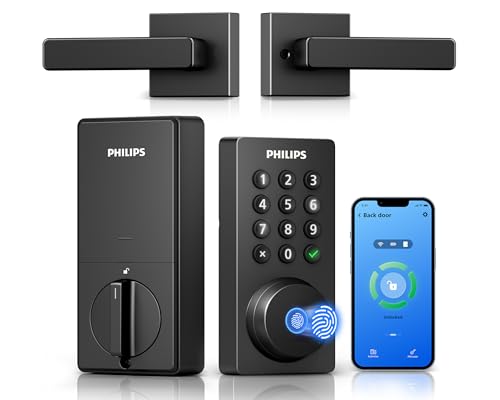
Philips 4200 Series Smart Wi-Fi Keypad Deadbolt
The Philips 4200 Series deadbolt bundle delivers built-in 2.4 GHz Wi-Fi, a fast 0.3-second fingerprint scanner, and a matching handle set without requiring an external hub. It is an ideal, budget-friendly hardware replacement for busy households and rental hosts seeking versatile keyless access.
Pros
- Built-in 2.4 GHz Wi-Fi eliminates the clutter and cost of an external bridge
- Includes a matching exterior handle set for a complete, coordinated door makeover
- Fast 0.3-second biometric fingerprint scanner makes everyday keyless entry effortless
- Extensive PIN options provide flexible scheduling for guests, cleaners, and short-term rentals
Cons
- Requires standard 1.5V alkaline batteries; incompatible with rechargeable or lithium cells
- Must be positioned within 33 feet of a 2.4 GHz Wi-Fi router for reliable off-site connectivity
- Does not natively support Apple Home, Apple Home Key, or Matter over Thread platforms
Veise VE017 Fingerprint Smart Deadbolt
The Veise VE017 is a versatile biometric deadbolt replacement featuring an on-device AI fingerprint scanner, anti-peep keypad, and local Bluetooth management via the KK Home App. It provides dependable keyless security for families, DIY homeowners, and rental property managers, with remote Alexa and Google integration available via an optional G1 Gateway.
Pros
- Multiple access options including fast AI fingerprint scanning, anti-peep keypad, fob cards, app control, and traditional keys.
- Local AES-128 encryption keeps biometric data and entry records stored directly on the lock hardware for enhanced privacy.
- All-metal zinc alloy housing with IP55 weather rating suitable for harsh exterior temperatures from -35 to 160 degrees Fahrenheit.
- Emergency exterior USB-C power port provides a reliable jump-start method if the 4 AA batteries run out.
Cons
- Remote out-of-home control and Alexa or Google Assistant voice integrations require a separate Veise G1 Gateway.
- Lacks native Apple Home, Apple Home Key, or Matter over Thread connectivity.
- Deadbolt latch motor requires precise strike plate alignment during installation to prevent binding or locking stalls.
Philips Wi-Fi Smart Deadbolt and Front Door Handle
The Philips Wi-Fi Smart Door Lock Set combines a fast biometric deadbolt with a matching front door handle, connecting directly to 2.4 GHz Wi-Fi without an external hub. With fingerprint scanning, an anti-peep keypad, app control, and Alexa or Google Assistant compatibility, it serves as a complete entryway upgrade for homeowners and rental hosts.
Pros
- Integrated 2.4 GHz Wi-Fi eliminates the clutter and cost of an extra plug-in gateway bridge.
- Includes both the smart motorized deadbolt and the matching lower door handle for a coordinated look.
- Five diverse unlocking methods provide practical entry choices for multi-generational families.
- Supports up to 100 unique, time-limited passcodes with real-time user-specific unlock notifications.
Cons
- Direct Wi-Fi locks generally consume battery power faster than low-power protocol alternatives like Z-Wave or Thread.
- Does not support Apple Home or Apple Home Key NFC tap-to-unlock functionality.
- Requires four AA alkaline batteries that are not included in the package.
Philips Wi-Fi Smart Deadbolt and Front Door Handle
The Philips Wi-Fi Front Lock Set combines an electronic smart deadbolt with two matching handles, delivering five entry options including biometric fingerprint access, PIN codes, physical keys, and app control. With direct remote access via the Philips App, Alexa and Google Assistant voice compatibility, and customizable auto-locking, it offers an all-in-one entryway upgrade for busy households and hosts.
Pros
- Complete entryway package including both the smart deadbolt and two matching coordinated handles
- Multiple entry choices including biometric fingerprint, customizable PIN codes, mobile app, physical key, and voice control
- Remote Wi-Fi management through the Philips App without needing an extra plug-in bridge
- Comprehensive PIN management with up to 100 user codes, unlimited single-use PINs, and recurring access schedules
- User-adjustable auto-lock timer ranging from 30 to 180 seconds for worry-free departures
Cons
- Relies on direct Wi-Fi connectivity, which requires a stable 2.4 GHz router signal near the entryway
- Does not feature native Apple Home, Apple Home Key, or Matter over Thread support
- Full lockset replacement requires removing existing exterior deadbolt and handle hardware, making it less ideal for strict rental agreements
Tapo DL100 Smart Wi-Fi Deadbolt Lock
The Tapo DL100 is a Wi-Fi-enabled residential smart deadbolt featuring backlit tactile buttons, BHMA Grade 3 certification, and direct app control without a separate hub. It offers dependable remote management and versatile PIN code options for busy households, rental hosts, and smart home enthusiasts using Alexa, Google Home, or SmartThings.
Pros
- Built-in Wi-Fi and Bluetooth eliminate the extra cost and setup of an external plug-in bridge
- High storage capacity supporting up to 200 custom access PIN codes with anti-peep random digit entry
- Verified BHMA Grade 3 durability rating and IP54 weatherproof construction for everyday exterior exposure
- Emergency USB-C jump port and two physical mechanical keys provide dependable backup entry options
- Direct voice assistant control through Amazon Alexa, Google Assistant, and Samsung SmartThings
Cons
- Lacks native Apple Home and Apple Home Key support for iOS-centric households
- Does not include an integrated biometric fingerprint reader
- Direct Wi-Fi communication reduces operational battery lifespan compared to Bluetooth-only use
ULTRALOQ Bolt SE Smart Lock with Matter over
The ULTRALOQ Bolt SE is an IP65-rated smart deadbolt combining built-in 2.4 GHz Wi-Fi and Matter over Thread connectivity with 7-in-1 keyless entry options. It is an excellent choice for homeowners and busy families seeking seamless voice integration with Siri, Alexa, or Google Assistant alongside flexible biometric access.
Pros
- Dual wireless connectivity with built-in 2.4 GHz Wi-Fi and Matter over Thread for flexible local and remote control
- Extensive credential capacity storing up to 50 fingerprints and 50 passcodes with scheduled and temporary access sharing
- Robust weather-resistant exterior hardware featuring zinc alloy construction and an IP65 waterproof rating
- Up to 18 months of extended battery performance when operating on a low-energy Thread mesh network
- Physical mechanical keyway backup with 2 keys included for peace of mind
Cons
- Matter over Thread functionality requires a separate, compatible Thread Border Router to integrate with third-party hubs
- Door position sensor is not included, meaning auto-lock operates on a preset timer rather than detecting open or closed door states
- Direct Wi-Fi remote access requires a 2.4 GHz wireless network connection within roughly 70 feet of your router
Sifely Keyless Entry Smart Door Lock with Handle
The Sifely Fingerprint Smart Lock delivers versatile 5-in-1 entry via biometric scanning, keypad PINs, smartphone app, fobs, and physical keys. It is a practical, DIY-friendly choice for families and rental hosts who want easy keyless access with optional Wi-Fi gateway expansion.
Pros
- Five distinct unlocking methods provide exceptional access versatility for family members and guests.
- Quick DIY installation on standard residential doors with a reversible lever for left or right swings.
- Convenient guest code generation via app or web dashboard designed for short-term rental management.
- Integrates with Amazon Alexa and Google Assistant when paired with the optional Wi-Fi gateway.
Cons
- Out-of-home remote unlocking and voice assistant functionality require a separate, optional Sifely WiFi Gateway.
- The manufacturer does not state an official ANSI/BHMA physical security grade or external IP weather rating.
- Lacks native integration with Apple HomeKit, Apple Home Key, or Matter over Thread platforms.
Frequently Asked Questions
Do smart locks without subscriptions require paid cloud storage for guest access codes?
No, the best smart locks without subscriptions store user credentials, schedules, and entry logs locally on the device or route them directly through free companion apps. Options like smart deadbolts with keypads allow you to generate permanent, scheduled, and one-time PIN codes without any monthly service fees. User data remains encrypted on board, providing full access management without subscription lockouts.
What happens if the smart deadbolt batteries die while you are locked outside?
You can unlock the door using the physical backup key or power the lock temporarily through an external emergency terminal. Most units feature a hidden physical keyway alongside an exterior USB-C port or 9V battery jump terminal. Applying temporary power from a power bank or 9V battery instantly activates the keypad so you can enter your code.
How do biometric fingerprint sensors perform in wet or freezing conditions?
Modern capacitive and optical sensors read prints within fractions of a second, but moisture or frost on your skin can occasionally delay recognition. Premium biometric fingerprint smart locks utilize self-learning AI algorithms and weather-resistant IP53 to IP65 exterior housings to maintain accuracy across cold climates. Drying your thumb or using the backlit keypad provides an immediate backup during severe storms.
Will a keyless smart deadbolt fit existing standard US exterior doors?
Yes, standard keyless electronic deadbolts are engineered to fit standard residential doors with a thickness between 1-3/8 inches and 2 inches. They accommodate standard borehole diameters of 2-1/8 inches and feature adjustable latch backsets for either 2-3/8 inches or 2-3/4 inches. Most homeowners complete the physical replacement within fifteen minutes using only a standard screwdriver.
Why does built-in Wi-Fi consume more battery power than Matter over Thread?
Direct Wi-Fi transceivers maintain high-bandwidth radio links that draw significant power during background syncs, typically delivering six to eight months of battery life on standard alkaline cells. In contrast, Matter over Thread uses an ultra-low-energy mesh network that can extend battery longevity up to eighteen months. Both options eliminate monthly fees, giving you free remote app access and push alerts.
About the author
John R. Delaney is a veteran technology editor and product reviewer specializing in home security, smart home devices, and wireless networking. With extensive experience evaluating connected security systems, cameras, smart locks, sensors, and networking equipment, he brings a practical testing mindset to consumer technology. His work emphasizes usability, performance, connectivity, and long-term value for homeowners building reliable smart security systems.